AI in Pine Script: ai.ask() gives a BUY or SELL verdict on your signal candle
Add real AI to your own Pine Script: ai.ask() sends the candle where your condition fired to an AI model and returns a weighted BUY or SELL call, an answer to your prompt, and optional Fibonacci, entry, stop-loss and targets, on the chart and on Telegram.
SuperCharting adds one function to Pine Script: ai.ask(). When your own condition fires on a live candle, for example a moving-average cross, the script sends that candle to an AI model with your question. The AI answers with a weighted BUY or SELL call and a written reply to your prompt. Your script gets the answer back as a value it can draw on the chart, and the same answer can go to your Telegram. It works in the online Pine editor, from an open chart or from a server alert with the chart closed.
What ai.ask() does
Your script decides when to ask; the AI decides what it thinks about that moment.
- Your condition, such as
ta.crossover(close, ema20), becomes true on a live candle. - SuperCharting sends the AI the chart (symbol, exchange, timeframe, your local time), the indicator's title and inputs, the exact condition with the values of its variables on that candle, the signal candle, the last 100 candles (you can choose 20 to 300), a few computed facts (ATR, range, volume against its 20-bar average) and recent headlines for the symbol.
- The AI may also read other timeframes, live quotes, a stock's fundamentals and the screener. It cannot change a chart, an alert or a script, and it never places orders.
- It must start its answer with a call: BUY or SELL with two weights that add up to 100, such as BUY 62 / SELL 38. There is no neutral answer; the larger weight wins, and a 50 / 50 goes to the signal's own side.
- Your script receives the answer as an
ai.verdictand can show it as a label on that candle.
Each candle is asked once. The open chart and a server alert share the same answer, and a saved answer comes back every time you reload the chart. Old candles are never asked when a chart loads, only live ones.
Your first AI script
This indicator asks the AI each time NIFTY crosses its 20-period EMA on the chart's timeframe:
//@version=6
indicator("AI verdict on EMA 20 cross", overlay = true)
ema20 = ta.ema(close, 20)
signal = ta.crossover(close, ema20) or ta.crossunder(close, ema20)
v = ai.ask(signal, "Check trend, momentum and volume for the next 10 bars. Answer in 3 short lines.",
     model = ai.model_opus, horizon = 10, side = close > ema20 ? ai.side_long : ai.side_short, id = "NIFTY EMA 20 cross")
if signal and v.status != "none"
    label.new(bar_index, high, ai.label_text(v), color = ai.color(v), textcolor = color.white,
              style = label.style_label_down, tooltip = ai.tooltip(v))
plot(ema20, "EMA 20", color.orange, 2)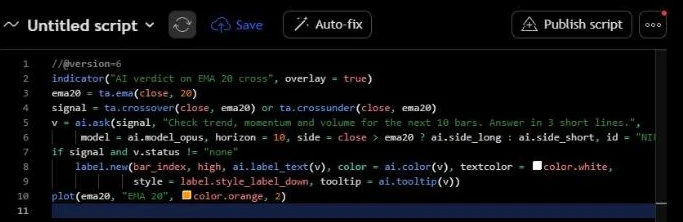
What each part does:
signalis the moment you care about. Pass it as the first argument rather than callingai.askinside anif, so the AI is told exactly which condition fired and with which values.- The prompt is your own instruction, up to 2,000 characters. Ask for what you would ask an analyst: "check the higher timeframe", "is volume confirming", "answer in Hindi", "3 short lines".
horizon = 10tells the AI its call is about the next 10 bars.sidetells it whether your signal is long or short. With the defaultai.side_autoit is read from the condition (crossoverlong,crossundershort).v.status != "none"keeps labels off old candles that were never asked.ai.label_text(v)readsAI ▲ BUY 62%,AI ▼ SELL 58%,AI …while the answer is on its way,Out of AI creditsorAI failed.ai.color(v)is green for BUY, red for SELL and grey otherwise.ai.tooltip(v)is the hover card: the call with both weights, the model, the alert id, when the signal fired and when the AI answered, and the full written answer.
How to add it to a chart
- Sign in, open a chart, for example
NSE:NIFTY, and pick an interval such as 5 minutes. - Open the Script Editor from the right-hand bar, click the script name and choose Create new → Indicator.
- Replace the template with the script above and press Add to chart. The orange EMA appears on the chart.
- Wait for the next live cross. While the market is open, the label appears on the signal candle as
AI …and turns into the verdict when the answer arrives, often within seconds and at most a few minutes. - Hover the label to read the full answer.
The AI only answers on live candles, so on a weekend or a market holiday nothing is asked until trading resumes.
Get every answer on Telegram, with the chart closed
To run it all day without a browser open, create an alert on the script:
- With the script on the chart, press Alert, set Condition to the script and, in Notifications, pick your Telegram chat.
- Press Create.
The server now runs the script on every new candle and asks the AI on every live signal. Each answer arrives in Telegram with the call, both weights, your alert id and both times in your time zone, for example Alert triggered 10:31:01 · AI verdict 10:31:11 IST (10 s).
The alert's Trigger setting does not limit ai.ask: it asks on every live signal even with "Only once", because the script never calls alert() itself. If your script also calls alert() or alertcondition(), use Once per bar close or Every time so the alert stays on after its first message.
To send answers from the open chart to Telegram as well, add telegram = true to the ai.ask call.
Fibonacci, entry, stop-loss and targets
When the prompt asks for Fibonacci levels, trend lines, support and resistance, a target, a stop-loss or a chart image, the AI also returns a drawing. SuperCharting snaps every point to the real candles and drops anything outside the chart.
//@version=6
indicator("Fib + AI plan", overlay = true)
fast = ta.ema(close, 9)
signal = ta.crossover(close, fast) or ta.crossunder(close, fast)
v = ai.ask(signal, "Do a Fibonacci and trend-line analysis of the last swing. Give a verdict with entry, stop-loss and two targets, and a chart image.",
     model = ai.model_opus, horizon = 10, telegram = true, side = close > fast ? ai.side_long : ai.side_short, id = "Fib plan")
if signal and v.status == "ok"
    ai.draw(v)
if signal and v.status != "none"
    label.new(bar_index, high, ai.label_text(v), color = ai.color(v), textcolor = color.white,
style = label.style_label_down, tooltip = ai.tooltip(v))- On the chart,
ai.draw(v)draws the Fibonacci swing with its 0, 0.236, 0.382, 0.5, 0.618, 0.786 and 1 levels, the trend lines, the levels and the Entry, SL and TP lines at their candles. Passlabels = falseto leave out the level names. - On Telegram, the message comes with a chart picture of the same drawing and the verdict on the signal candle, the full written analysis and one plan line in the form
🎯 Entry … · SL … · TP1 … · TP2 … · R:R …. - In the script,
v.entry,v.sl,v.tp1,v.tp2andv.tp3hold the plan as numbers (nawhen the AI gave none), so you can plot them or use them in your own logic.
All the arguments
ai.ask(when, prompt, model, freq, bars, horizon, telegram, id, side)
| Argument | Default | Meaning |
|---|---|---|
when | required | The condition (series bool) |
prompt | required | Your instructions, up to 2,000 characters |
model | ai.model_opus | ai.model_opus, or ai.model_fable for the deepest analysis |
freq | ai.freq_once_per_bar_close | Or ai.freq_once_per_bar: ask on the forming candle the first time the condition is true |
bars | 100 | Candles sent with the question, 20 to 300 |
horizon | 10 | How many bars the BUY or SELL call is about |
telegram | false | Also send answers from the open chart to Telegram (an alert always sends to its own chat) |
id | "" | A name for the call, shown in Telegram as Alert: <id>; it also tells several ai.ask calls in one script apart |
side | ai.side_auto | ai.side_long or ai.side_short, or a series string such as close > ma ? ai.side_long : ai.side_short |
And the fields of the verdict v:
| Field | Value |
|---|---|
v.status | "ok", "pending", "no_credits", "failed" or "none" (never asked) |
v.call | "BUY" or "SELL" |
v.direction | 1 for BUY, -1 for SELL, na without an answer |
v.buy_pct, v.sell_pct, v.pct | The two weights and the winning one |
v.answer | The written answer to your prompt |
v.model | The model that answered |
v.asked_time, v.answered_time | When the signal fired and when the AI answered, in UNIX milliseconds like time |
v.left | AI calls the account's remaining AI credits still cover |
v.entry, v.sl, v.tp1..v.tp3 | The trade plan, when the prompt asked for one |
Limits
ai.ask()is on the Ultimate plan (₹1,999 a month) and Super Ultimate. Each call, with either model, uses 1 AI credit from the account's credits for its 30-day period, the same credits Super Pilot uses: 200 on Ultimate, 1,000 on Super Ultimate. An account can also make at most 90 calls a day over all its indicators. A new day starts at midnight IST.- On Essential, the free plan, and on Plus and Premium, the script still compiles and runs, but every call shows "Out of AI credits".
- Past the limit, the label reads "Out of AI credits" and Telegram gets one note. A call that fails is not counted.
- The AI answers on live candles only; it does not backfill history, so you cannot backtest the AI's calls in the Strategy Tester.
What it is not
- Not a signal service. The AI only looks at the moments your own script chooses, and its answer is an opinion on that candle. It is not investment advice. Check it against your own plan.
- Not a trading bot.
ai.askcannot place, change or cancel orders. - Not a guarantee. A 62% BUY means the AI weighs the evidence 62 to 38 for BUY, not that price rises 62% of the time.
Frequently asked questions
Is ai.ask() free?
No. It is included on the Ultimate and Super Ultimate plans, within their AI credits. On Essential, the free plan, and on Plus and Premium, the calls show "Out of AI credits". See /billing for prices.
Does ai.ask() work in TradingView?
No. ai.ask() is a SuperCharting function. A script that uses it runs in SuperCharting's Pine-compatible editor; the rest of the script is ordinary Pine Script v6.
Why does my label stay at "AI …"?
The question has been sent and the answer is on its way, often within seconds and at most a few minutes. If the call fails, the label reads "AI failed" and the call is not counted.
Why do old candles have no AI label?
Only live candles are asked, so a chart that loads history shows labels only on signals that fired while the script was running, on the chart or in an alert.
Can I ask in Hindi or get a different format?
Yes. The prompt decides the form of the written answer: language, length, bullet points or a table. The BUY or SELL call with its weights always comes first.
Can I use several ai.ask calls in one script?
Yes. Give each one its own id, for example "Breakout" and "Pullback", so the answers and the Telegram messages stay apart.